
Image optimization for a San Antonio business website means compressing image files, using modern formats like WebP or AVIF, setting correct dimensions, and loading images in the right order so pages stay fast without sacrificing visual quality. According to the latest Web Almanac, images account for approximately 37% of total page weight on the median homepage, making them the single largest contributor to slow load times. Unoptimized images directly hurt Core Web Vitals scores, search rankings, and the number of visitors who stay long enough to contact a business.
San Antonio Business Website Image Optimization
Image Optimization for San Antonio Business Websites: How to Keep Pages Fast and Visually Sharp
Get In Touch

A San Antonio business website can have strong branding, compelling copy, and a clear call-to-action and still lose visitors before any of it registers. If the images on that page take too long to load, most visitors are already gone.
Recent industry data shows that pages taking longer than 2.5 seconds to load fail Google’s Core Web Vitals threshold for Largest Contentful Paint, which directly impacts search rankings. According to the 2025 Web Almanac, images are the LCP element on 76% of mobile pages, which means image performance is the single largest factor in whether a page passes Google’s speed standards. For a San Antonio business competing for local customers, slow images directly reduce both rankings and conversions.
At Texas Web Design, we build and optimize websites for San Antonio businesses that need to perform as well as they look. If your site has never been tested for image performance, request a free image performance audit or call 210-985-8528, and we will show you exactly which images are slowing your site down and what to fix first.
Why Images Are the Biggest Performance Problem on Most Websites
Images are the heaviest resource on the average business website. According to the 2025 Web Almanac, which analyzes real-world data from millions of websites, images account for approximately 37% of total page weight and the median homepage carries over 1 MB of image data alone. That is more than HTML, CSS, and fonts combined.
For San Antonio businesses, this matters in two direct ways. First, heavy images slow pages down, which increases the likelihood that visitors leave before a page fully loads. Second, slow pages score poorly on Google’s Core Web Vitals, specifically Largest Contentful Paint (LCP), which measures how quickly the main visible content of a page loads. A slow LCP score pushes a site below faster competitors in local search results.
Why mobile performance is especially important
Most local searches in San Antonio happen on mobile devices. Mobile connections are slower and more variable than desktop connections, which means unoptimized images hit mobile visitors hardest.
A responsive web design approach accounts for this by serving appropriately sized images for each screen, but responsive layouts alone do not fix underlying file size problems. Image optimization has to be built in from the start.
The Core Image Optimization Techniques San Antonio Businesses Need to Know
Optimizing images does not require technical expertise from the business owner. It does require that whoever builds and maintains the website understands and applies these techniques consistently.
Choose the right file format
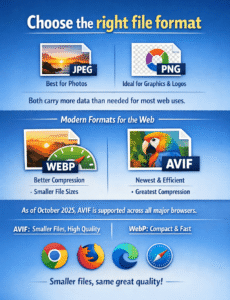
The format an image is saved in determines how much data it carries. JPEG, PNG, WebP, and AVIF are the four formats that cover virtually every use case on a modern business website, but they differ significantly in file size and browser support.
| Format | File Size vs JPEG | Browser Support | Transparency | Best Use Case |
|---|---|---|---|---|
| JPEG | Baseline | 100% | No | Legacy fallback for photographs |
| PNG | Larger than JPEG | 100% | Yes | Logos, icons, graphics with transparency |
| WebP | 25-35% smaller | ~99% | Yes | Default format for photographs in 2026 |
| AVIF | 50%+ smaller | ~95% | Yes | Hero images and high-traffic landing pages |
According to Google’s Chrome developer documentation, updated October 2025, both WebP and AVIF are supported across all major browsers and deliver significantly smaller file sizes than JPEG or PNG at the same visual quality.
For a San Antonio web design project, WebP is the safest default for photographs because of its near-universal browser support, while AVIF is the better option for hero images and high-traffic pages where the additional compression directly impacts Largest Contentful Paint scores. Converting images to WebP or AVIF at the point of upload is one of the fastest ways to reduce page weight without any visible change to how images appear on screen.
Compress images before uploading
File format is only part of the equation. Within each format, compression settings determine how much data the image file actually carries. Lossy compression removes image data that the human eye cannot detect, reducing file size without a visible drop in quality. Tools like Squoosh, TinyPNG, and ImageMin are widely used for this purpose and are accessible without technical expertise.
The goal is to find the smallest file size that still looks sharp at the size it will be displayed. A hero image displayed at 1,200 pixels wide does not need to be uploaded at 4,000 pixels wide, and a team photo thumbnail does not need the same resolution as a full-page background.
Set explicit width and height on every image
When a browser loads a page, it needs to know how much space each image will occupy before the image file itself arrives. If width and height are not defined in the code, the browser cannot reserve the right space. Content shifts as images load, pushing text and buttons around on the page.
This directly affects Cumulative Layout Shift (CLS), one of Google’s three Core Web Vitals metrics. Poor CLS scores reduce search visibility and create a frustrating experience for visitors, particularly on mobile. Setting dimensions on every image is a simple, high-impact fix that is handled at the custom web development level and should be standard on every build.
Use lazy loading for below-the-fold images
Not every image on a page needs to load the moment a visitor arrives. Images that sit below the visible area of the screen, what developers call below the fold, do not need to download until the visitor scrolls toward them. Lazy loading delays those downloads, freeing up bandwidth and processing time for the images and content the visitor actually sees first.
This technique is applied by adding a simple attribute to image code and is now natively supported by all major browsers without additional scripts. The important exception is the hero image or any image visible above the fold when the page first loads. That image should always load immediately, and applying lazy loading to it is one of the more common mistakes that damages LCP scores.
How Image Optimization Connects to Search Rankings
 Image optimization is not just a speed issue. It connects directly to how a San Antonio business website performs in local search engine optimization.
Google’s Core Web Vitals, which include LCP, Interaction to Next Paint (INP), and Cumulative Layout Shift (CLS), are confirmed ranking factors. Pages that fail those thresholds have a measurable disadvantage against competitors whose pages pass them.
For businesses competing in local San Antonio search, where multiple companies often offer similar services with similar content quality, page experience scores function as a tiebreaker.
A site with fast, well-optimized images and a passing LCP score will outrank an otherwise equivalent site that fails it.
Alt text on images also contributes to search visibility. Every image on a business website should have a descriptive alt attribute that tells search engines what the image contains.
Alt text written to describe the actual image content, rather than stuffed with keywords, helps the site appear in image search results and improves accessibility for visitors using screen readers.
Common Image Mistakes San Antonio Business Websites Make
Most image performance problems on small business websites fall into the same categories.
- Uploading original camera or phone photos without resizing or compressing them is the most common issue. A photo taken on a modern smartphone is typically 2 to 5 MB in compressed format, and uploading it directly to a website page without any processing means every visitor has to download that file in full.
- Using JPEG or PNG for all images when WebP or AVIF would produce the same visual result at a fraction of the file size is another widespread issue, particularly on older sites that were never updated to use modern formats.
- Applying lazy loading to every image on a page, including the hero image, is a technical mistake that slows down LCP scores rather than improving them. The hero image should always be prioritized, not deferred.
- Missing or generic alt text leaves both search engines and screen reader users without any description of what the image shows. Every image that carries meaningful content should have an accurate, descriptive alt attribute.
Recommended Image Optimization Tools for San Antonio Businesses
Image optimization does not require expensive software or technical expertise. The right tools handle most of the work automatically once they are configured correctly. Below are the tools most commonly used on professional San Antonio business websites, grouped by what they do.
Compression and format conversion tools
These tools reduce file size and convert images to modern formats before upload.
- Squoosh: A free, browser-based tool from Google that lets you compare original and compressed versions side by side. Best for one-off image optimization with full visual control.
- TinyPNG: Free for occasional use with paid plans for higher volume. Handles JPEG, PNG, and WebP. Best for quick batch compression without installing software.
- ImageOptim: Free Mac-only tool that compresses images locally without uploading them anywhere. Best for designers handling large batches of images.
WordPress optimization plugins
These plugins automatically compress and convert images during upload, which removes the manual step from the workflow.
- ShortPixel: Converts uploads to WebP and AVIF automatically and serves the right format to each browser. Includes bulk optimization for existing image libraries.
- Imagify: Offers three compression levels and automatic WebP conversion. Strong choice for sites with mixed image types.
- Smush: Free version handles compression and lazy loading. Paid version adds WebP conversion and CDN delivery.
Performance measurement tools
Optimization without measurement is guesswork. These tools show exactly how the changes affect real performance.
- Google PageSpeed Insights: Free Google tool that scores pages on Core Web Vitals using both lab data and real user data. The first place to check after any image change.
- GTmetrix: Provides a detailed waterfall view showing which images load in what order and how long each takes. Useful for diagnosing specific bottlenecks.
- WebPageTest: The most technically detailed free testing tool. Allows testing from different locations and connection speeds, which matters for businesses serving customers across San Antonio and the surrounding metro.
- Chrome DevTools: Built into the Chrome browser. The Lighthouse panel runs the same tests as PageSpeed Insights and the Network tab shows the actual file size and load time of every image.
For ongoing WordPress speed optimization, pairing one optimization plugin with monthly performance checks in PageSpeed Insights is a practical baseline.
The 7-Step Image Optimization Checklist
Use this checklist for every image added to a San Antonio business website. Following these steps in order prevents the most common performance problems from reaching the live site.
- Resize the image to match the largest dimension at which it will actually display. A hero shown at 1,200 pixels wide should be uploaded at 1,200 pixels wide, not 4,000.
- Convert to WebP or AVIF before uploading. Use Squoosh, TinyPNG, or a WordPress plugin to handle this automatically.
- Compress the file to remove invisible data. The goal is the smallest file that still looks sharp at the display size.
- Set explicit width and height attributes in the image code so the browser reserves the correct space and prevents layout shift.
- Add descriptive alt text that accurately describes what the image shows. This helps search engines, image search results, and screen readers.
- Apply
loading="lazy"to every image below the fold so it only downloads when the visitor scrolls toward it. - Apply
fetchpriority="high"to the hero image or any image visible above the fold so the browser downloads it before anything else.
A consistent process around these seven steps is what keeps a website fast over time, even as new pages, blog posts, and product photos are added.
Keep Your San Antonio Website Fast and Competitive
Image optimization is not a one-time task. Every new image uploaded to a business website is an opportunity to either help or hurt performance. A consistent process for compressing, formatting, and sizing images before they go live is what separates websites that stay fast over time from ones that slow down incrementally with every update.
Texas Web Design builds San Antonio websites with image optimization built into the process from day one, not added as an afterthought. Our digital marketing services include technical performance as part of every project, because a website that loads slowly cannot do its job no matter how well it is designed. Call 210-985-8528 to find out where your site stands today.
Frequently Asked Questions
What is image optimization for a website?
Image optimization is the process of reducing image file sizes and formatting them correctly so web pages load faster without a visible drop in image quality. It includes choosing the right file format, compressing images before uploading, setting correct dimensions, and controlling the order in which images load on a page. For San Antonio business websites, image optimization directly affects page load speed, Core Web Vitals scores, and search rankings.
What image format is best for a business website in 2026?
WebP and AVIF are the recommended formats for web use as of 2026. Both are supported across all major browsers and produce significantly smaller file sizes than JPEG or PNG at comparable visual quality, according to Google’s Chrome developer documentation. JPEG remains appropriate for photographs when WebP or AVIF is not available, and PNG is still used for graphics requiring transparency. For most San Antonio business websites, converting uploads to WebP at the point of upload is a practical and high-impact optimization.
How do unoptimized images affect Google rankings?
Unoptimized images increase page weight and slow load times, which directly impacts Largest Contentful Paint (LCP), one of Google’s three Core Web Vitals ranking signals. A slow LCP score indicates to Google that visitors are waiting too long for the main content of the page to appear. Pages that fail Core Web Vitals thresholds rank below comparable pages that pass them, particularly in competitive local search results.
What is lazy loading and should my website use it?
Lazy loading delays the download of images that are not visible in the browser window when a page first loads. The browser only downloads those images as a visitor scrolls toward them. This reduces the amount of data that must load upfront and speeds up initial page load times. Every image below the fold should use lazy loading. The hero image or any image visible above the fold when the page loads should never be lazy loaded, as that delays the LCP and hurts performance.
How large should images be on a business website?
Images should be sized to match the largest dimension at which they will actually be displayed, not their original capture size. A hero image displayed at 1,200 pixels wide should be uploaded at 1,200 pixels wide, not at 4,000 pixels wide as a camera or phone might capture it. Uploading oversized images forces every visitor to download data they will never see. After resizing, compression further reduces file size without affecting visual quality at the display size.
Can image optimization improve my website without a full redesign?
Yes. Compressing existing images, converting them to WebP or AVIF, adding missing alt text, and setting explicit dimensions are all changes that can be made to an existing website without rebuilding it. The impact on load speed and Core Web Vitals scores can be significant depending on how unoptimized the current images are. A performance audit identifies exactly which images are causing problems and what the fix for each one is.
How often should a San Antonio business optimize its website images?
Image optimization should be applied to every image at the point of upload, not treated as a periodic cleanup task. Establishing a consistent process for resizing and compressing images before they are added to the site prevents performance from degrading over time. Sites that skip this process tend to slow down incrementally with every new page or blog post, making periodic audits of existing image assets a useful practice alongside good upload habits.
Can a San Antonio business improve its Core Web Vitals without rebuilding the site?
In many cases, yes. Common improvements include compressing and converting images to modern formats, adding dimension attributes to images and media, auditing and removing unnecessary JavaScript and third-party scripts, and improving server response times through better hosting or caching. How much improvement is possible without a rebuild depends on how the original site was built and how severe the existing performance issues are.